
How the 2025 Mitsubishi Outlander’s 12.3″ Smartphone-Link Display Audio with Navigation Elevates Daily Driving in Appleton, WI
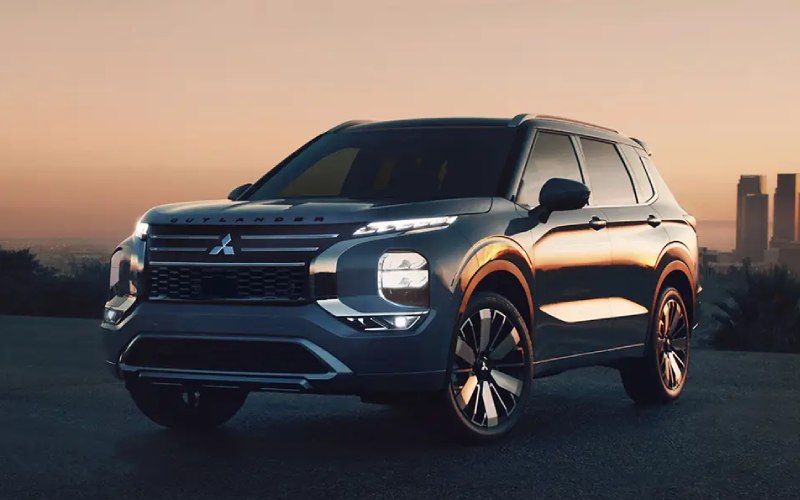
Russ Darrow Waukesha Mitsubishi – How the 2025 Mitsubishi Outlander’s 12.3″ Smartphone-Link Display Audio with Navigation Elevates Daily Driving in Appleton, WI
Modern errands and commutes revolve around quick information, clear directions, and distraction-free controls. That’s where the 12.3″ Smartphone-Link Display Audio with Navigation in the 2025 Outlander stands out. The large, crisp screen integrates navigation, audio, and phone features in one intuitive hub, while wireless Apple CarPlay and Android Auto help keep cords at bay. Beyond convenience, the layout and responsiveness support safer interactions—important when snow flurries roll in and you want to keep hands on the wheel and eyes on the road. Physical controls for essentials like volume complement the touchscreen, striking a smart balance for real-world driving around Appleton’s busy corridors and neighborhood streets.
Built-in navigation anchors the system, and it’s particularly helpful when your phone’s signal dips on the outskirts of town or during weekend trips. Routes display clearly on the wide-format screen, and voice guidance remains easy to follow, even with lively cabin conversation. On higher trims and packages, MI-PILOT Assist™ with Navi-link Adaptive Cruise Control can leverage map data to smooth out speed adjustments as traffic ebbs and flows, taking the edge off regional highway stretches. The result is a calmer drive, especially when you’re juggling school drop-offs, ice rink runs, and grocery pickups. And with Yamaha® tuning elevating the premium audio experience, hearing turn-by-turn prompts over your favorite playlists feels natural and unobtrusive.
Daily practicality matters. The system’s thoughtful menu structure shortens the learning curve, so you’re not digging through multiple layers to find essentials. Wireless charging on select trims aligns with cord-free smartphone mirroring, and the reorganized 2025 center console provides a smarter spot for keys and small items. Add available Multi-View Camera System visuals on that expansive display, and you’ll get a helpful, wide-angle perspective for parallel parking downtown or navigating tight driveways in winter. The Outlander’s technology isn’t just about features—it’s about the way those features come together to make each trip more efficient and less stressful.
If you’re upgrading from an older vehicle, you’ll likely notice how quickly your smartphone connects on startup and how consistently the system recognizes voice commands. That reliability pays off during back-to-back errands when you’re switching playlists, calling a family member, or requesting the next route. And because the interface is designed around predictable, high-frequency tasks, you’ll build confidence as muscle memory develops—no more second-guessing which menu hides the function you want. The interface also complements available driver assists, including Lane Keep Assist, Lane Departure Prevention, and Traffic Sign Recognition, by presenting clear prompts without overwhelming the screen with clutter.
For families balancing multiple schedules, the 12.3″ system becomes a genuine time-saver: it centralizes what you use most and streamlines how you access it. That cohesion is what separates great tech from good tech—the details that feel small individually but add up to smoother days. When paired with the Outlander’s roomy three-row interior and refined ride quality for 2025, this infotainment suite helps the SUV feel just as useful during dog-walking duty as it does on longer drives to see relatives.
Russ Darrow Waukesha Mitsubishi keeps the focus on how tech supports your real routine, with guided demonstrations that show the system’s strengths and how it works alongside available MI-PILOT Assist™. We’re proud of serving Madison, Racine, and Appleton with walk-throughs that answer the questions you’ll have after living with the vehicle—like setting preferred routes, customizing quick-access tiles, and pairing multiple phones for a family-friendly experience.
Frequently Asked Questions:
Does the 12.3″ system require a cable for Apple CarPlay or Android Auto?
Wireless Apple CarPlay and Android Auto are supported, so you can connect without plugging in, and selected trims include a wireless charger to complete the cable-free setup.
What happens if my phone’s signal drops during navigation?
With built-in navigation, you can rely on onboard guidance even when cellular coverage is spotty, and the wide display keeps maps clear and easy to follow.
Is the audio upgrade worth it?
The available Yamaha® system adds clarity and depth that audiophiles appreciate, and even the standard eight-speaker setup is tuned to deliver balanced, enjoyable sound.
Can the screen show cameras and maps at the same time?
The Multi-View Camera System integrates cleanly with the display, giving you large, helpful camera views. You can quickly switch back to maps when you’re ready to drive off.
How hard is it to learn the interface?
The menus are thoughtfully organized for frequent tasks, and physical controls for key functions reduce distractions. Most drivers feel comfortable after only a few trips.
0 comment(s) so far on How the 2025 Mitsubishi Outlander’s 12.3″ Smartphone-Link Display Audio with Navigation Elevates Daily Driving in Appleton, WI